
Unlock Learning with
Peer Assessment and/or Authorship Transparency
Deliver an equitable learning experience that is built on authentic collaborative opportunities for students while asessing their thinking process.



Integrate with your LMS


ThE KRitik loop
How Does Kritik Work?


Step 1: Course Setup
Leverage AI to set up your course, assignments and rubrics with the AI-Course Creator New or simply transfer your existing assignments from your LMS into Kritik.
Step 2: Calibration Activity
Set the benchmark for doing peer evaluations to align students' grading power to yours that reflects their evaluation abilities.


Step 3: Create an Activity
Schedule your assignment and design your rubrics with AI on Kritik for students to create their work within Kritik before the deadline.
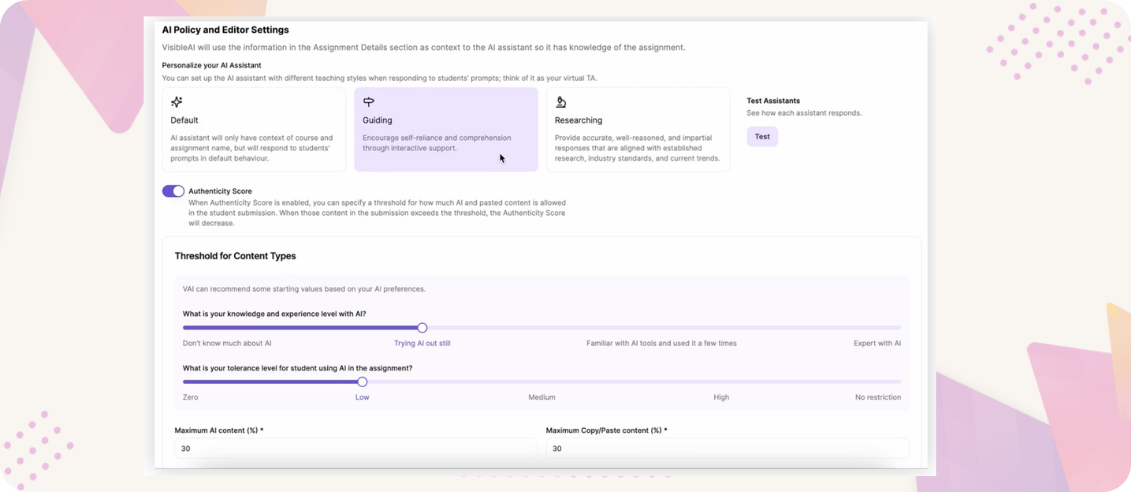
Step 4: Set up AI policy & Guidelines
Instructors can align AI usage policies with course learning outcomes and academic integrity guidelines for each assignment.
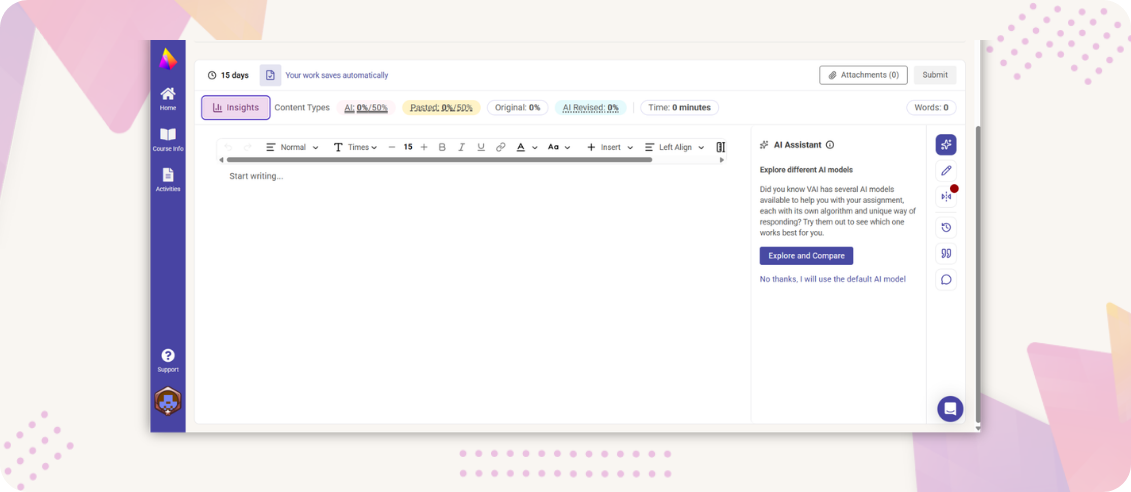
Step 5: Create an Assignment
Students create an anonymous submission in the editor window. They can track their insights along the way on the header and also use the AI assistant of their choice, for guidance.
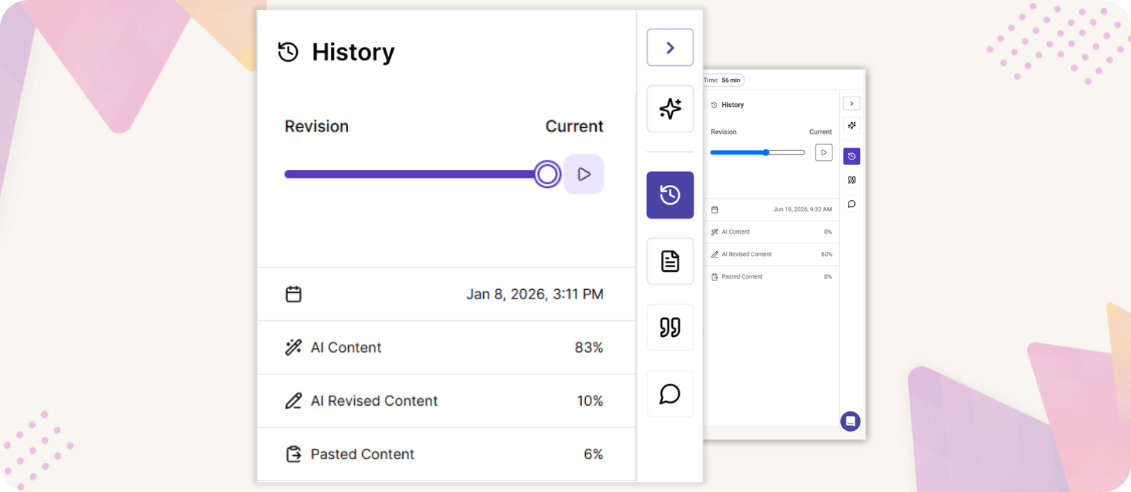
Step 6: View Revision History
Students can view their revision history and see how their assignment progressed over the timeline.
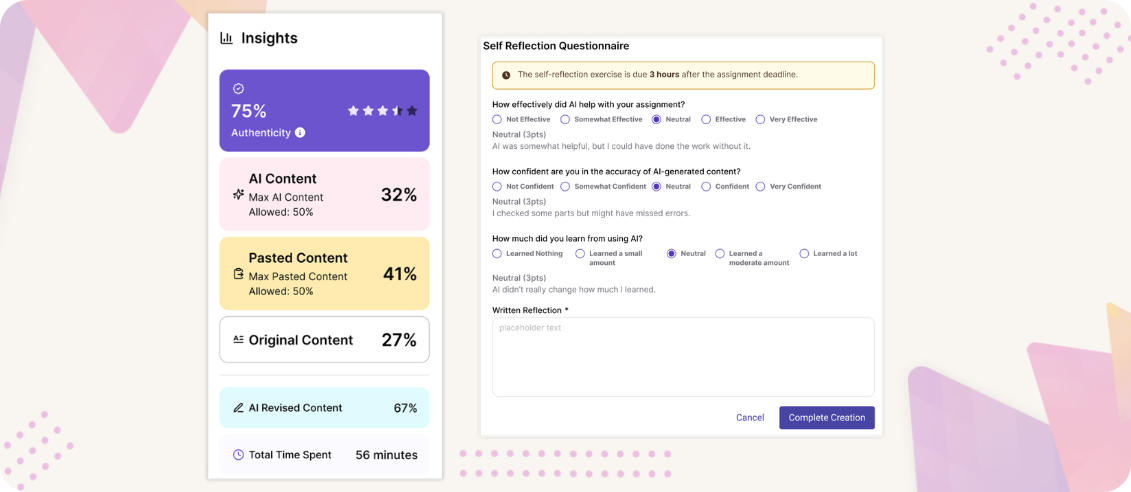
Step 7: Self-reflection
After submitting their creation, students review their final insights and answer the self-reflection questionnaire.
Step 8: Evaluate Stage
Now, students are assigned 3-5 assignments anonymously for which they give detailed qualitative and quantitative evaluations.


Step 9: Feedback Stage
Students respond to the evaluations they received from their peers on how critical and motivational they were to their learning.
Step 10: Finalize grade
Instructors can resolve any grading disputes and review class performance to finalize the grades for the course.

Step 1: Course Setup
Leverage AI to set up your course, assignments and rubrics with the AI-Course Creator New or simply transfer your existing assignments from your LMS into Kritik.
Step 2: Calibration Activity
Set the benchmark for doing peer evaluations to align students' grading power to yours that reflects their evaluation abilities.
Step 3: Create an Assignment
Schedule your assignment and design your rubrics with AI on Kritik for students to submit their work in any file format before the deadline.
Step 4: Evaluate Stage
Now, students are assigned 3-5 assignments anonymously for which they give detailed qualitative and quantitative evaluations.
Step 5: Feedback Stage
Students respond to the evaluations they received from their peers on how critical and motivational they were to their learning.
Step 6: Finalize grade
Instructors can resolve any grading disputes and review class performance to finalize the grades for the course.
Step 1: Course Setup
Leverage AI to set up your course, assignments and rubrics with the AI-Course Creator New or simply transfer your existing assignments from your LMS into Kritik.
Step 2: Set up AI policy & Guidelines
Instructors can align AI usage policies with course learning outcomes and academic integrity guidelines for each assignment.
Step 3: Create an Assignment
Students create an anonymous submission in the editor window using instructor provided rubric. They can track their insights along the way on the header and also use the AI assistant of their choice, for guidance.
Step 4: View Revision History
Students can view their revision history and see how their assignment progressed over the timeline.
Step 5: Self-reflection
After submitting their creation, students review their final insights and answer the self-reflection questionnaire.
Step 6: Submit or Download Report
Students can submit directly or download the assignments with the references and all the prompts that were used to build the assignment giving the instructor and student a transparent teaching and learning experience.
.png)
our Impact
Why do Instructors love Kritik?

Catherine Walter
Program Director of CTEL and Bilingual Programs
PLNU
"I feel like VisibleAI has been really helpful for my students, especially for supporting students in their classrooms who are learning English as a second language. It's allowed them to access strategies and lesson plan ideas that really support their multilingual learners in a way that wasn't possible before."

Christine Tokunaga
Program Director of Elementary and ECE
PLNU
"As a university, we were unsure about how to incorporate AI into our curriculum. But VisibleAI has provided a safe and transparent way for my students to explore the power of generative AI tools. It’s been an invaluable resource for building their teaching skills.”

Ross Brunett
Assistant Professor, Athletic Training & Kinesiology
PLNU
“When I introduced VisibleAI to my students, it was met with initial hesitation because they had never received proper guidance on how to use AI effectively and responsibly (for their school work). But as we worked and learned to use VisibleAI together, we loved it. My students appreciated the guidance and were able to use AI more confidently.”

Mohammed Zia
Professor, Data Science and Engineering
University at Buffalo
"With Kritik, I can create customized rubrics, and some kids did come out and say that without Kritik, they would have missed out on some smaller but important points. My goal was to get them [students] to plan the structure and the execution of the solution, and Kritik has helped me with that."

Steven Forsey
Lecturer, Chemistry
University of Waterloo
"Beyond just writing answers down, peer evaluation on Kritik encourages students to think about what they are doing, write it down, and reflect upon what they’ve done, which is an essential part of their work lives after university. I was very happy with the way it worked out, and the students did not have any issues adapting to Kritik for their submissions."

Whitney Sivils-Sawyer
Professor, Curriculum Instruction and Leadership
Louisiana Tech University
“I’ve used other peer assessment technologies in the past, but Kritik’s algorithm is built in a way where we can have data pulled to see the incredibly valuable feedback loop. Kritik has been great in giving them multiple points of feedback that weren’t just me. This transformed their learning experience."

Kaston Carpenter
Asst. Professor, Psychology
Michigan State University
“The fact that Kritik is so inexpensive, especially given the opportunities that they have to engage with their peers, the students feel the value they receive from Kritik is worth far more than the price they pay. Other platforms are more than double the price, in addition to course fees and materials.”

Karen Sunabacka
Assoc. Professor, Music
University of Waterloo
“I only have so much time, and I just found that students wrote that much more than I ever could that forces them to notice things and respond. This elevates the engagement levels in the evaluation stage. Students learn to communicate with each other in a way that doesn’t put them down but raises them up."

Thomas Holloway
Assoc. Professor, Finance
University of Calgary
"Doing the project is obviously a learning activity, but then reading other people's version of the project, and putting grades on it, providing comments, is the thesis of Kritik as a product. Kritik is an excellent way to stay relevant generationally. As a real workplace tool, it caters to a world that students live in, like Instagram or TikTok."

Sara Buckallew
Assoc. Professor, Nutrition
University of Missouri
“I really appreciated how students could see what other students actually did because they don’t typically go out and see what their peers are doing. When they hear constructive criticism from their peers, it really elevates the feedback that the students are getting and elevates the learning experience for everyone involved.”

Jonathan Wisco
Asst. Professor, Anatomy & Neurobiology
Boston University
"Many students grow up in a culture where grades are everything and while they are important, there is a need to create spaces in which they can feel valued and help their peers feel valued. Kritik can be used in any space where feedback is a central part of the course or learning activity."
Join over 200,000 users across 250+ institutions using Kritik Toolkit


Less Time Grading, More Time Coaching
Book a personalized walkthrough of Kritik with our experts
to see how we can make the tool work for you!